How to Add Remote Execution Nodes to a Basic Red Hat Ansible Containerized Install
Level Up Team
The scenario is: You want the simplicity and low infrastructure cost of deploying Red Hat Ansible Automation Platform (AAP) 2.5 containerized on a single VM (aka the “container growth topology“). But you also need to be able to run remote execution nodes, perhaps in far away data centers.
In such a case, you can add remote execution nodes via the AAP installer. You’ll simply have to modify the example **inventory-growth** file (Level Up pro tip: **cp inventory-growth inventory-growth2** instead) to look something like this:
# modified inventory-growth + remote execution node file:
# This is the AAP installer inventory file intended for the Container growth deployment topology.
# This inventory file expects to be run from the host where AAP will be installed.
# Please consult the Ansible Automation Platform product documentation about this topology's tested hardware configuration.
# https://docs.redhat.com/en/documentation/red_hat_ansible_automation_platform/2.5/html/tested_deployment_models/container-topologies
#
# Please consult the docs if you're unsure what to add
# For all optional variables please consult the included README.md
# or the Ansible Automation Platform documentation:
# https://docs.redhat.com/en/documentation/red_hat_ansible_automation_platform/2.5/html/containerized_installation

# This section is for your AAP Gateway host(s)
# -----------------------------------------------------
[automationgateway]
aap.example.org ansible_connection=local

# This section is for your AAP Controller host(s)
# -----------------------------------------------------
[automationcontroller]
aap.example.org ansible_connection=local

# This section is for your AAP Automation Hub host(s)
# -----------------------------------------------------
[automationhub]
aap.example.org ansible_connection=local

# This section is for your AAP EDA Controller host(s)
# -----------------------------------------------------
[automationeda]
aap.example.org ansible_connection=local

# This section is for the AAP database
# -----------------------------------------------------
[database]
aap.example.org ansible_connection=local

[execution_nodes]
remote-ex1.example.org receptor_type=execution
remote-ex2.example.org receptor_type=execution

[all:vars]
# Ansible
# ansible_connection=local

# Common variables
# https://docs.redhat.com/en/documentation/red_hat_ansible_automation_platform/2.5/html/containerized_installation/appendix-inventory-files-vars#ref-general-inventory-variables
# -----------------------------------------------------
postgresql_admin_username=postgres
postgresql_admin_password=x

bundle_install=true
# The bundle directory must include /bundle in the path
bundle_dir='{{ lookup("ansible.builtin.env", "PWD") }}/bundle'


redis_mode=standalone

# AAP Gateway
# https://docs.redhat.com/en/documentation/red_hat_ansible_automation_platform/2.5/html/containerized_installation/appendix-inventory-files-vars#ref-gateway-variables
# -----------------------------------------------------
gateway_admin_password=x
gateway_pg_host=aap.example.org
gateway_pg_password=x

# AAP Controller
# https://docs.redhat.com/en/documentation/red_hat_ansible_automation_platform/2.5/html/containerized_installation/appendix-inventory-files-vars#ref-controller-variables
# -----------------------------------------------------
controller_admin_password=x
controller_pg_host=aap.example.org
controller_pg_password=x
controller_percent_memory_capacity=0.5

# AAP Automation Hub
# https://docs.redhat.com/en/documentation/red_hat_ansible_automation_platform/2.5/html/containerized_installation/appendix-inventory-files-vars#ref-hub-variables
# -----------------------------------------------------
hub_admin_password=x
hub_pg_host=aap.example.org
hub_pg_password=x
hub_seed_collections=false

# AAP EDA Controller
# https://docs.redhat.com/en/documentation/red_hat_ansible_automation_platform/2.5/html/containerized_installation/appendix-inventory-files-vars#event-driven-ansible-controller
# -----------------------------------------------------
eda_admin_password=x
eda_pg_host=aap.example.org
eda_pg_password=x
Zooming in on the highlighted block above:
# remote execution nodes:
[execution_nodes]
remote-ex1.example.org receptor_type=execution
remote-ex2.example.org receptor_type=execution
Note: As of this writing, Red Hat AAP current requires the following ports between controllers and remote execution nodes (but always reference the latest available documentation for your AAP 2.5 build):
- TCP 22 (for initial setup and future AAP updates)
- TCP 80/443 (between execution nodes and private Automation Hub)
- TCP 27199 (for ongoing connectivity between controller and execution nodes)
Upon successful install, you should see new “Node type: Execution” instances with a Status of “Ready”.
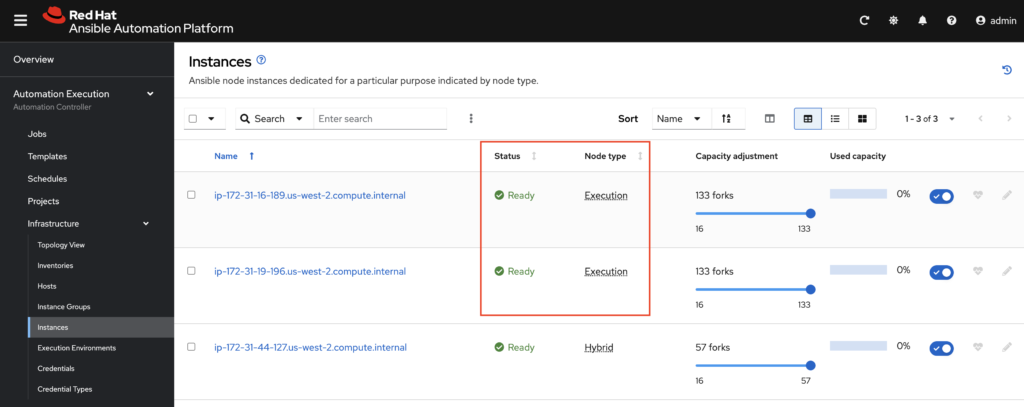
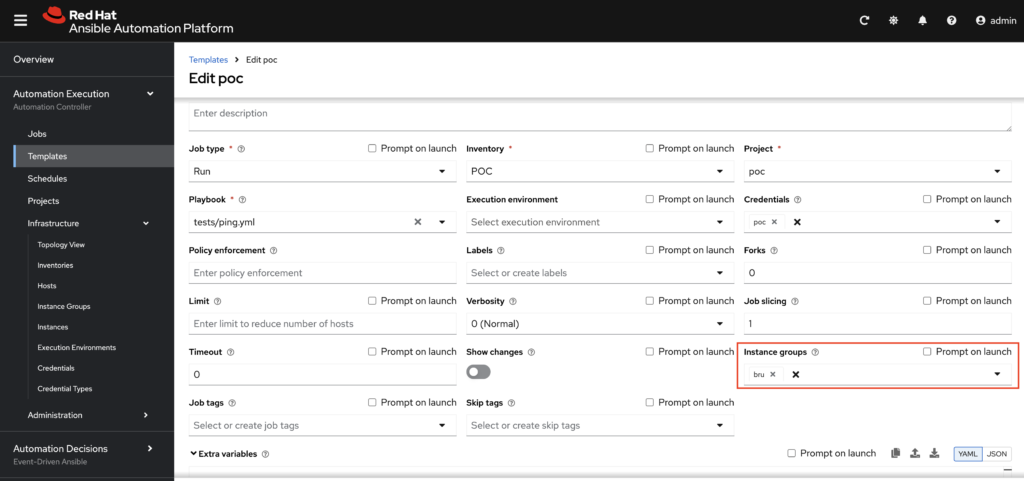
Running remote execution nodes unlocks a few key benefits, including being able to create instance groups per datacenter. You can also have job templates run on individual instance groups:
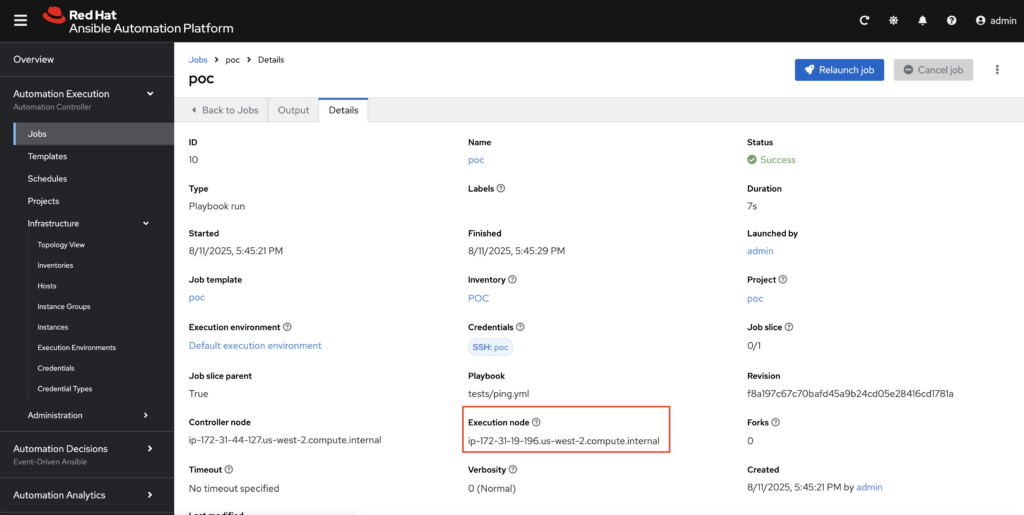
When you look at the AAP job history, you’ll even see the execution node a successful job ran on:
Red Hat Premier Partner Level Up knows infrastructure automation. Reach out if you’re looking for more insights in your own environment like this!